Vivere Colorado LLC · Capability Showcase

We build the web by hand, at machine speed.

A Western Colorado studio shipping custom-coded sites, web apps, and photorealistic AI media — powered by a 12,000-line master framework refined over thousands of hours into a repeatable, audited build system.

12k+Lines of framework
111Sequenced prompts
9Live properties
18Reference codebases
0Page builders
Contents

Everything in this showcase

No sections match that search.

Try “animation”, “framework”, “Lighthouse”, “SIGNAL”, or clear the box.

1The work

Live, shipped, and open to inspection

Every link below is in production right now. Open any of them and read the source — hand-authored markup, no bundler output, no framework runtime. That transparency is the point.

Client sites

Live

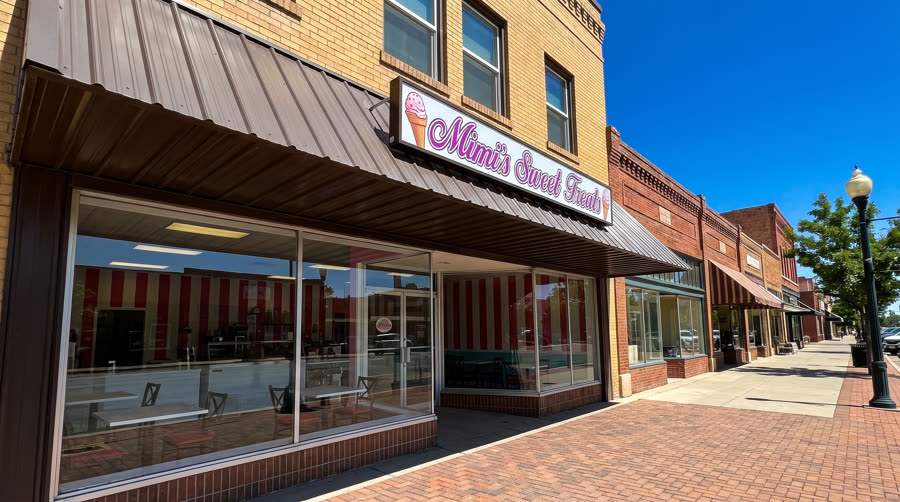
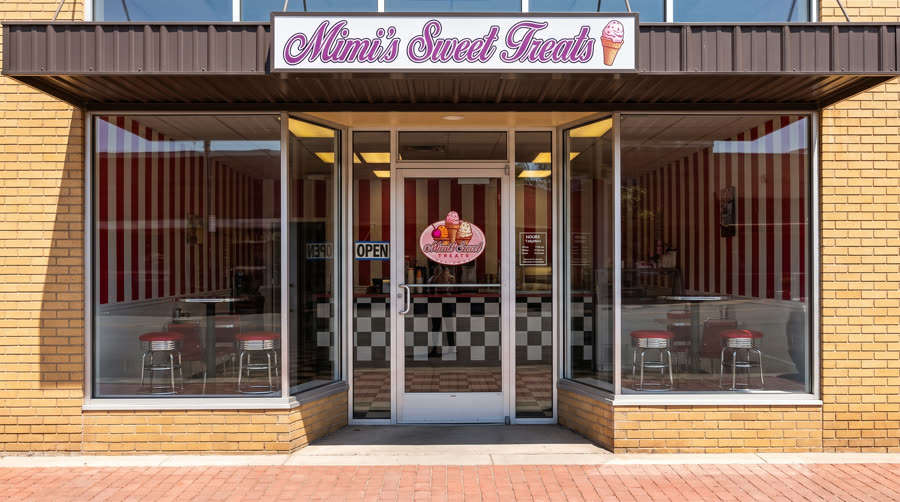
Mimi's Sweet Treats

Full rebuild off a hosted platform. Marketing site, live flavor-board API, serverless backend, POS/accounting integration layer, automated social pipeline.

mimissweettreats.com →

Live

Grand View Event Center

Event venue platform delivered against a two-week launch deadline, with continuous post-launch iteration — calendars, events, enquiry funnels.

gveventcenter.com →

Live

Top it off Smoothie Cafe

Built on the current house architecture — container queries, :has(), View Transitions, scroll-driven animation, OKLCH colour.

topitoffgj.com →

Live

Vivere

The studio's own site and the reference implementation of the house design system — a 2,500-line stylesheet driven entirely by tokens.

vivereweb.com →

Products, engines & apps

Product

SIGNAL

Client-facing media system. Takes a campaign brief plus a stored brand kit and produces scheduled, on-brand multi-platform output.

vivere-signal.pages.dev →

Engine

ET Engine

Drag-racing elapsed-time prediction — a physics model blended with regression over real run-log data. Built for Wandell Racing.

wandel-et-engine.pages.dev →

Engine

Estimate Engine

Quoting calculator with physical-unit modelling and a live storyboard panel for walking a client through how a number was reached.

vivere-estimate-engine.pages.dev →

Data

The Yard

MLB home-run intelligence — its own ingestion, data model, and analytical front end.

the-yard.pages.dev →

Game

Void Tide

A browser game on Phaser — physics, state machines, a sprite pipeline, and a full build/release flow.

tentacle-tide.pages.dev →

Internal

Vivere Playbook

The living documentation surface for the framework, deploy rituals, and house standards.

vivere-playbook.pages.dev →

The breadth is the point

Static marketing sites · serverless functions with SQL and key-value stores · POS, accounting and banking integrations · a database-backed CMS with an admin gate · magic-link auth and payment webhooks · a physics-and-regression prediction engine · a browser game · an AI video pipeline · automated multi-platform distribution. Most studios this size do one of these.

2AI media, in-house

A finished brand film, start to finish

Below is a real 70-second spot produced entirely in this studio. Cast, product, location and set all generated, then directed, rendered and cut. No stock footage, no crew, no location fee, no casting call.

“Hot Day on Main Street” — six generated scenes cut to a single film with diegetic audio, delivered in landscape and vertical.

The locked asset library

Every recurring person, product and place is generated and frozen as a reference sheet before any video runs. That's what holds a face, a branded cup, or a room identical across every cut.


Owner character reference sheet
@owner
Customer character reference sheet
@customers
Branded product reference sheet
@product
Storefront exterior reference
@storefront
Entrance reference
@door
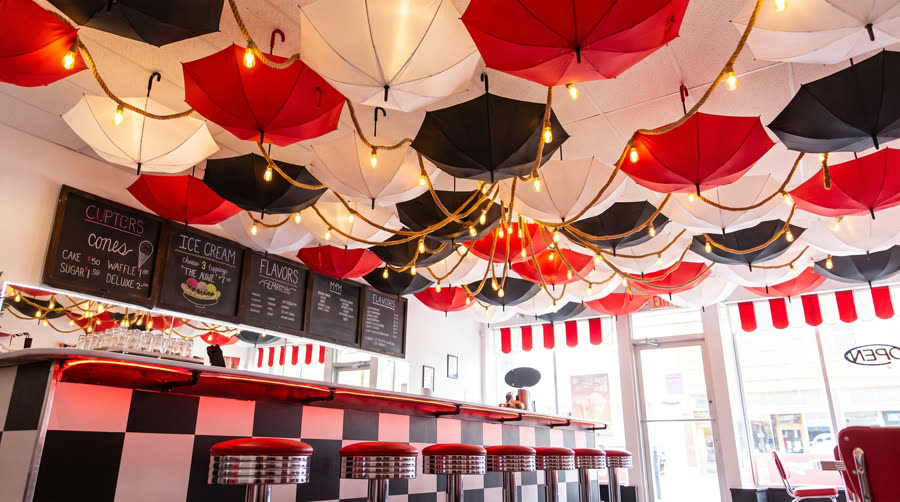
Interior ceiling installation
@ceiling

The three-stage pipeline

Lock the assets

Generate every character, product and location as a named still reference. Cheap to iterate, and the foundation everything downstream points at.

Direct the shots

Turn the concept into a shot-by-shot prompt document — camera, lens, blocking, acting beat, and a global style prefix applied to every cut.

Render & assemble

Generate each scene against the locked references, then cut to landscape and vertical masters with real-frame thumbnails.

What else the media stack produces

Motion graphics

HTML/CSS compositions rendered to video — kinetic type, stat reveals, brand stings. Version-controlled like any code.

Social cards

Two rendering tiers — scripted for volume, headless-browser for web-grade design. One config drives a whole campaign.

Voice & explainers

Narrated explainer episodes with generated voice, timed captions and branded art direction.

Channel automation

Scheduled multi-platform publishing with each platform's hard constraints encoded as enforced rules.

Why the order is non-negotiable

Video generation costs 17–45× what a still costs. Locking identity on cheap images before spending on video isn't a preference — it's the entire economics of the pipeline, and it's written into a skill so nobody has to rediscover it.

3The Master Framework

Thousands of hours, written down

This is the core asset — a documented build system covering every phase from client discovery through post-launch maintenance, refined across every project that came before it. Version 3.21 and still evolving.

The ten modules

MODULE 01

Framework Identity

The non-negotiables. Stack constraints, what we will and won't build, and the reasoning behind each.

MODULE 02

Pre-Build Checklist

Client discovery, domain, analytics property, Search Console, Business Profile, repo, hosting, forms — before any code.

MODULE 03

Rules Template

The machine-readable rulebook dropped into every project so house standards are enforced from line one.

MODULE 04

File Structure

1,159 lines of canonical templates — every file, every default, ready to instantiate.

MODULE 05

The Prompt Library

111 sequenced prompts: init, config, content, structured data, integrations — and four separate audit passes.

MODULE 06

Deploy Workflow

Git branching, staging-then-production, edge hosting, custom domains, SSL verification.

MODULE 07

Analytics & Tracking

Conversion events, lead capture, phone and CTA click tracking, goal configuration.

MODULE 08

Advanced Styles & Motion

The animation system — scroll-driven, view transitions, container queries, SVG and Lottie.

MODULE 09

Build Phases 0–7

Eight gated phases with explicit exit criteria. Nothing advances until its checklist passes.

MODULE 10

Maintenance & Handover

Credential delivery, ongoing care, and exactly what the client owns at the end.

The eight build phases

PhaseGate
0 · Pre-BuildDiscovery complete, domain registered, analytics and Search Console properties created, repo and hosting provisioned, forms configured.
1 · ScaffoldAll framework files created, assets in place, full favicon set, first push, hosting auto-deploy confirmed, staging branch live.
2 · Design SystemTokens set, project config verified across every file — rules, styles, deploy config, robots.
3 · Content BuildAll page content, complete structured data, staged and reviewed on a preview URL after each chunk.
4 · Forms & IntegrationAnalytics live on every page, form handler wired, submission tested end to end, realtime activity confirmed.
5 · SEO & PerformanceSitemap submitted, then SEO, performance and accessibility audits each run and fixed. Lighthouse verified in a clean profile.
6 · Staging QAFinal pre-launch check passes, zero placeholders, every link and form verified, stakeholder approval recorded.
7 · Production LaunchMerge, SSL verified, live form test, indexing requested, conversion goals set, baseline Lighthouse saved, credentials delivered.

The reference codebase library

Eighteen production-ready implementations — already solved, already tested, so nothing gets rebuilt from scratch.

Scroll-Driven Animations

Native CSS scroll timelines with graceful fallback.

Container Queries

Component-level responsiveness beyond media queries.

View Transitions API

Multi-page sites that feel like a single-page app.

Advanced Styles

849 lines — the house visual language.

Advanced Animations

362 lines of the motion system.

SVG Animated Icons

Vector iconography that animates without payload cost.

Lottie Integration

Designer-authored motion when it earns its weight.

Dark Mode

Token-driven theming with system preference support.

Image Pipeline

Responsive sources, modern formats, zero layout shift.

Service Worker

Offline resilience and repeat-visit performance.

SEO & Schema

Structured data, heatmaps and A/B testing.

Style Guide Page

A living component reference shipped with the build.

Why the system beats the code

Any competent developer can write a landing page. What compounds is a system where discovery, design tokens, prompt sequence, audit gates and launch procedure are all written down and reinforce each other. That's the difference between doing the work and owning a method — and it's what you'd be handed on day one instead of building over years.

4Quality & delivery

Nothing ships on a hunch

Four formal audits run before any site goes live, each with its own prompt and pass criteria. Then launch itself is a checklist, and the scores are saved as a baseline to measure against for the life of the site.

SEO audit

Titles, descriptions, canonicals, Open Graph, structured data, sitemap and robots — verified, not assumed.

Performance audit

Image sizing, script deferral, cache policy, layout-shift prevention, font loading strategy.

Accessibility audit

Landmarks, labels, heading order, focus states, contrast, and 44px minimum tap targets.

Pre-launch check

The final gate — every item must return PASS before staging is approved for production.

The Lighthouse gate

Performance ≥ 90 · Accessibility ≥ 95 · SEO = 100 — measured in a clean incognito profile, not a warm cache. A build does not advance to launch until it clears. After go-live, a final audit on the production URL is saved as the permanent baseline.

Client reporting

Clients receive documentation, not just a URL. This is a genuine differentiator — and translating technical results into language a business owner can act on is a real, marketable skill.

ArtifactWhat it does
ProposalScope, deliverables and pricing agreed before a line of code is written.
Site auditA structured assessment of what exists today — and what it's costing them.
Build reportWhat was delivered against what was scoped, with measured results rather than adjectives.
Developer guideHow the site works, handed over in full — the client is never locked in.
Value reportDelivered work priced against market rates, so the client sees exactly what they received.
The translation layer

Every technical score in a client report is paired with a plain-English explanation of what it means for their business. Most engineers never develop that ability — here it's part of the deliverable.

5The method

Lessons become procedure, not folklore

The framework tells you what to build. The skills system makes sure a mistake is only ever made once.

Most people using AI for development are prompting: describe a task, get output, correct it — and the correction dies with the conversation. The next session repeats it.

We capture corrections as skills: a folder with a plain-Markdown file the agent loads only when it's relevant. The agent keeps just the name and description in working memory and pulls the full body on demand — which is what lets dozens of skills coexist without drowning the context window.

From the deploy skill, verbatim

“Every step below exists because it caught a real bug in this workspace's history — skipping one reintroduces that bug class.” One step: always verify on the unique per-deploy URL, never the production alias, because the alias lags fresh deploys long enough to make a good deploy look broken.

Three lessons captured in a single afternoon

Skills vs. memory — a deliberate split

Skills hold durable procedure — rules that stand until deliberately changed. A separate system holds dated project state: what shipped, what's blocked, what a client still owes. Memory is always treated as a point-in-time observation to re-verify; a skill is a standing rule. Keeping them apart is how you avoid confidently acting on stale facts.

6The craft

Platform-first, always

The house position: the browser got extremely good, and most sites still reach for libraries they no longer need. Here's actual framework code — and this page is running it.

Scroll progress — zero JavaScript

The bar at the top of this page. No scroll listener, no library, no layout thrash — the browser drives it natively.

CODEBASE-CSS-Scroll-Driven-Animations
/* No JS needed — replaces GSAP scroll progress */
.scroll-progress-css {
  position: fixed;
  height: 3px;
  background: linear-gradient(90deg, var(--accent), var(--accent-alt));
  transform-origin: left;
  scale: 0 1;
  animation: scaleProgress auto linear;
  animation-timeline: scroll();
}
@keyframes scaleProgress { to { scale: 1 1; } }

View Transitions — SPA feel, static site

Multi-page sites that transition smoothly between documents, with no client-side router and no framework.

CODEBASE-View-Transitions-API
/* Makes plain HTML pages feel like a SPA */
::view-transition-old(root),
::view-transition-new(root) {
  animation-duration: 0.3s;
  animation-timing-function: ease-in-out;
}
::view-transition-old(root) {
  animation-name: slideOut;
}
Everything moving on this page is CSS

The progress bar, every section reveal, the card lifts, the pulsing status dots — zero animation libraries, zero scroll listeners. Scroll-driven animations, :has(), container queries, text-wrap: balance and fluid clamp() type. It degrades cleanly on older browsers and stops entirely under prefers-reduced-motion.

The design system contract

4px spacing engine

Every margin and padding is a multiple of four, referenced by token. Magic numbers are banned, so rhythm stays identical across every site.

Fluid type, no breakpoints

Every size is a clamp(). Typography scales smoothly with the viewport instead of stepping at arbitrary widths.

Semantic colour tokens

Components never touch raw hex. Everything references a named token — which is what makes a full re-skin a small, safe change.

Accessibility by default

44px tap targets, visible focus rings, skip links, contrast rationale recorded with the token — not retrofitted after an audit.

Motion that respects you

Reduced-motion jumps to the final state rather than just slowing down. Motion is garnish, never a gate on content.

Tested at 320px

Mobile audits run at 375px and 320px, because a fix verified only at 375 has shipped broken before.

7Working with it

State the goal, not the keystrokes

The biggest adjustment for most people. Describing the outcome and its constraints beats dictating a procedure — and it lets the system tell you when your assumed procedure was wrong.

Less effectiveOpen styles.css, find the button class, set padding to 12px, add a hover state with a 0.2s transition.
Why it underperformsYou've pre-decided the implementation. If 12px breaks the 4px spacing rule, or hover-only fails on touch, that never surfaces — you get exactly what you asked for, bug included.
More effectiveThe primary buttons feel cramped on mobile and there's no feedback when you tap them. Fix it within the house token system.
What comes backA change using existing spacing tokens, meeting the 44px tap-target minimum, handling touch as well as hover, respecting reduced-motion — plus a note if any rules conflicted, so you decide.

A real exchange from this month

RequestWhen pouring the shake into the cup it automatically makes a whipped topping swirl — can we make sure the shake fills the cup, then we add the whipped cream with a canister to create the swirl, for more realism.
ResultThe shot list split one beat into two, with an explicit instruction that the first shot ends flat and bare. A stainless canister was added as a locked prop reference. Scene re-rendered — and the underlying gotcha went into a skill so the next ad starts correct.

That's the method in miniature: a plain-language note about realism, translated into a concrete change, verified by re-rendering, then captured so the lesson persists.

8Your first 90 days

What you'd actually learn

You don't need to arrive knowing any of this. You need to read carefully, verify before asserting, and be willing to write down what you learn. The framework does the rest of the teaching.

Week 1–2

Read the shipped work, learn the tools

Open the live sites and read their source. Install and drive the AI coding tool. Learn the review gate and deploy ritual by shadowing a real deploy. Goal: ship one small verified change to a real site.

Week 3–4

The framework, hands-on

Run the prompt sequence on a real build. Work inside the token system — no raw hex, no magic numbers. Run the four audits and clear the Lighthouse gate yourself.

Month 2

Author your first skill

Hit a problem, solve it, then capture the solution so nobody solves it twice. Writing a good one is harder than it looks — the description has to be sharp enough that the agent knows when to reach for it.

Month 3+

Own a surface

Take real ownership — a client relationship, a product pilot, the media pipeline, or the quality infrastructure. At this size ownership is available early, because there's nobody else holding it.

The guardrails that protect you

RuleWhy it exists
Review gate before every commitNothing commits without an explicit go-ahead, even after a clean verified deploy. Enforced in tooling, not left to good intentions.
Verify before assertingNever say something works because it should. Fetch the URL, read the file, run the check.
No fabricated data, everIf you don't know, say so. An internal audit once found invented data presented as real — it was stripped and a correction shipped the same day.
Deploy URL, not the aliasAliases lag fresh deploys. Checking the wrong one makes a good deploy look broken and triggers a fix for a bug that never existed.
Secrets stay out of documentsCredentials live in per-project environment files and platform secret stores — never in code, chat, or documents like this one.
Narrate as you goSurface findings as they happen rather than batching a summary. Wrong turns get caught while they're still cheap.
9Get a head start

Learn this before day one

Every link verified working. The first four will take you further than anything else.

The AI coding tool

Skills — the core idea here

Free official courses & video

Models & prompting

The rest of the stack

10Joining

The method outlives the model

A fair question: AI tooling changes monthly. Why learn a method built on top of it? Because the method isn't the tool.

  • Decomposing a goal so a machine can execute it — and knowing which parts must stay human. This gets more valuable as models improve.
  • Writing verifiable instructions. A good skill is a spec precise enough to execute and falsifiable enough to check. That's just good engineering writing.
  • Knowing what to verify. The hardest part of AI-assisted work is recognising confident wrongness — judgement built by getting burned and writing down the burn.
  • Separating durable procedure from dated state. A distinction most teams never make.
  • Routing cost against capability. Matching task to model is a real trade-off that persists as long as models differ in price.

Intellectual property & access

What's protected

The framework, prompt libraries, product source and pricing models are the studio's core assets. A copyright application has been filed on the codebase, and a documented provenance record covers authorship across the workspace.

What you'd sign

A confidentiality and IP-assignment agreement is a prerequisite to codebase access. Read it properly — and you're welcome to have your own counsel look at it.

AI authorship, disclosed

Much of this codebase was produced with AI assistance. That's stated openly in filings rather than obscured, and it shapes how the work is protected.

Where you'd have room

Automated testing and CI, security hardening, and bringing the starter template fully up to the newest architecture are all genuinely available — not someone else's territory.

The actual argument

Most people using AI at work are reactive — prompt, correct, forget, start from zero tomorrow. The alternative is a system that compounds: every correction becomes a rule, every rule makes the next task faster, and the accumulated judgement outlives whichever model is current. That compounding is the durable asset — and here it already exists, written down, waiting to be handed to you.